
As of May 2025, Immigration and Customs Enforcement (ICE) and other federal agencies are swarming the hallways and lobbies of immigration courthouses, striking fear into people who wish to fight deportation through legal channels.
Remember: People in deportation proceedings can request that their hearings be online rather than in person.
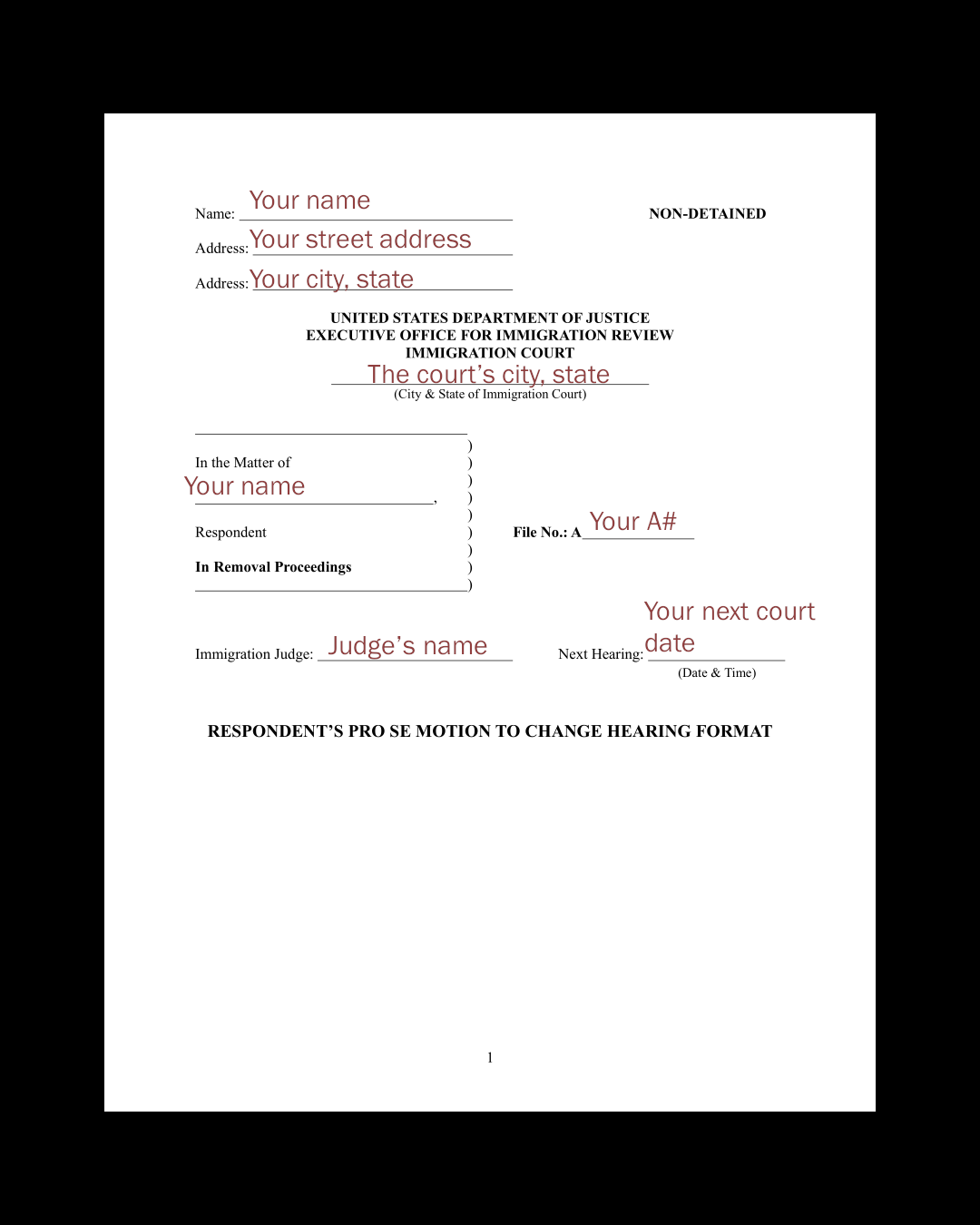
Non-citizens with legal representation can have their lawyers make a motion to move their hearings online. Those without lawyers can do it themselves by filing a pro se Motion to Change format.
pro se: Representing oneself (in court); without an attorney.
Filing a Pro Se Motion to Change format
WHAT TO SUBMIT
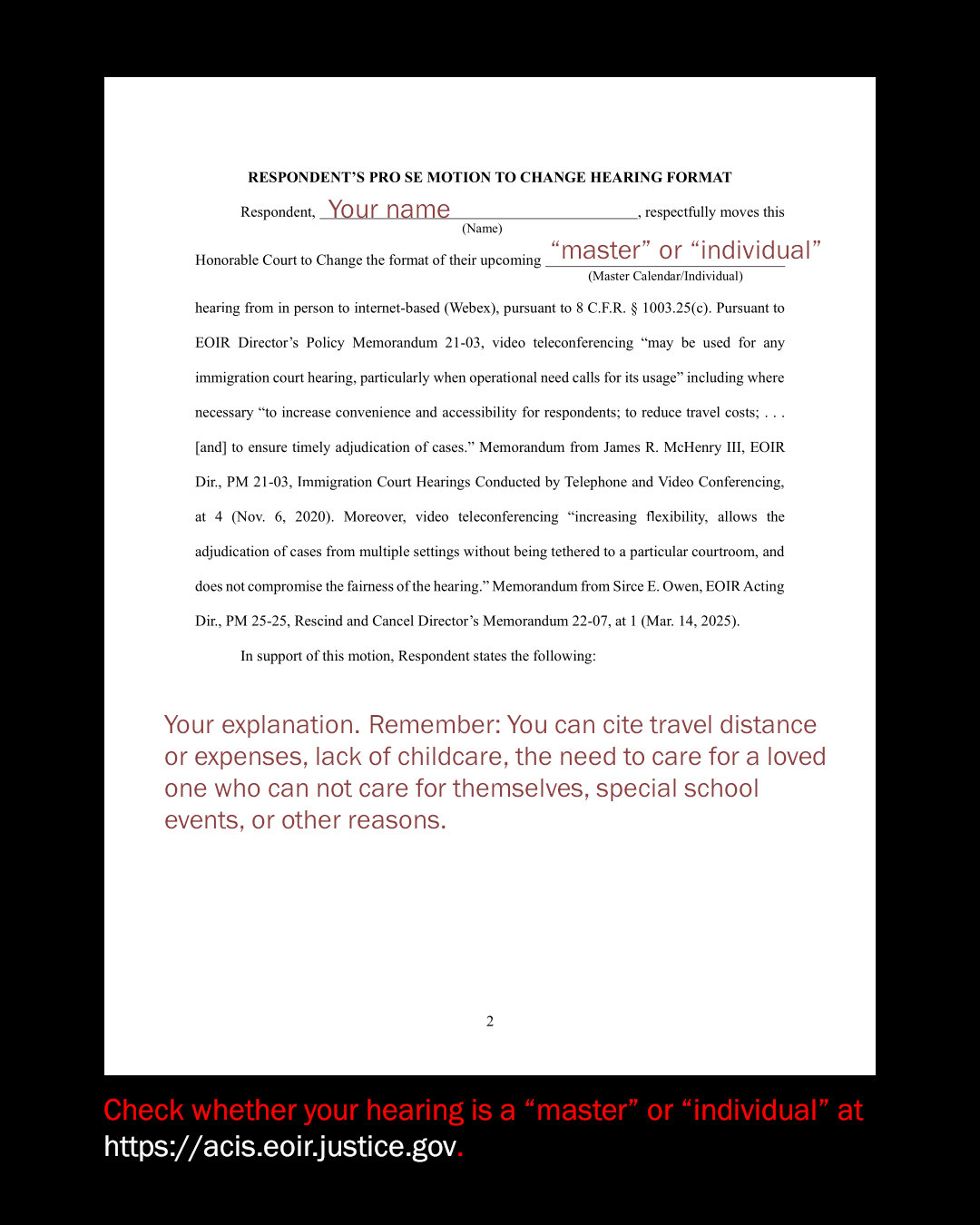
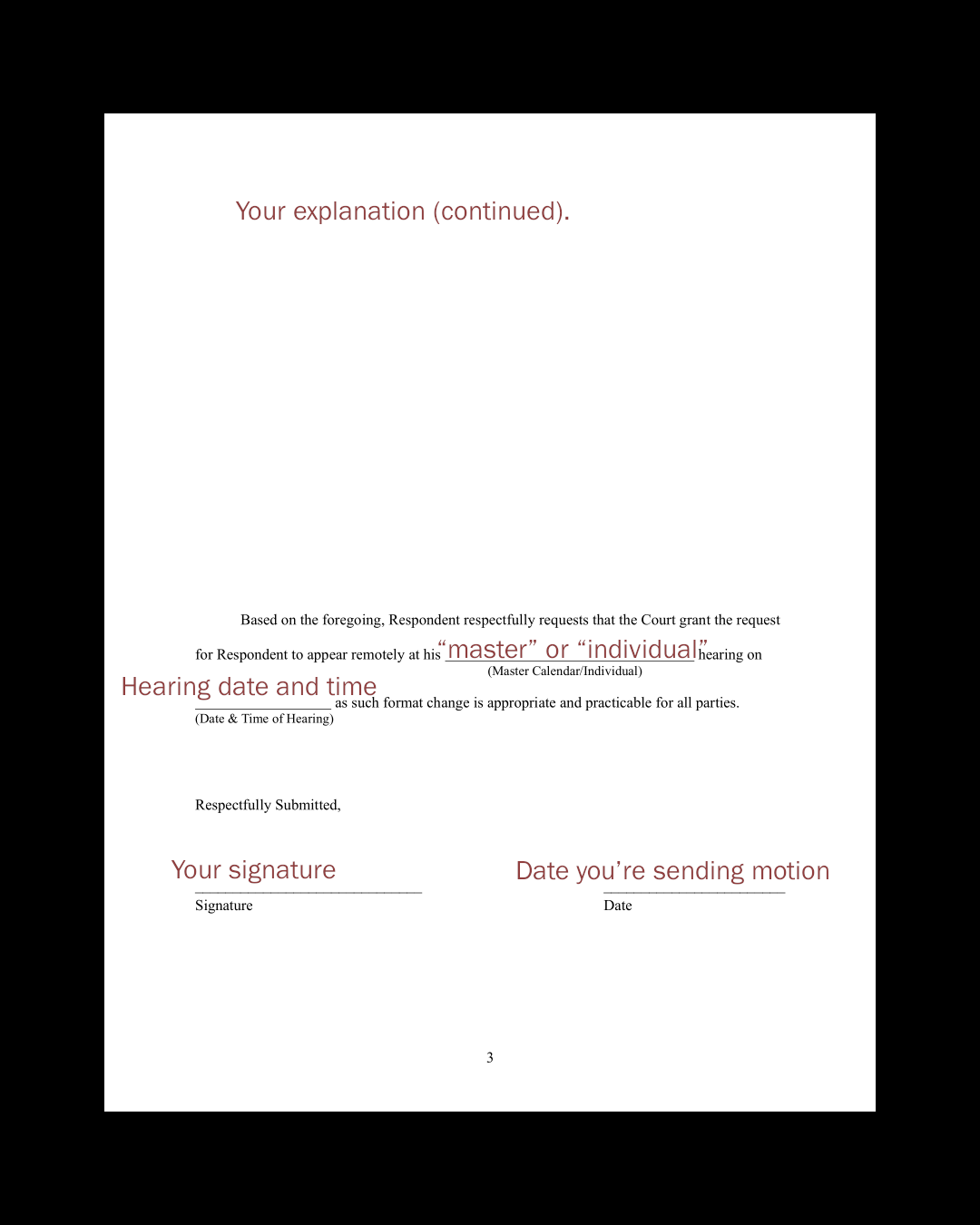
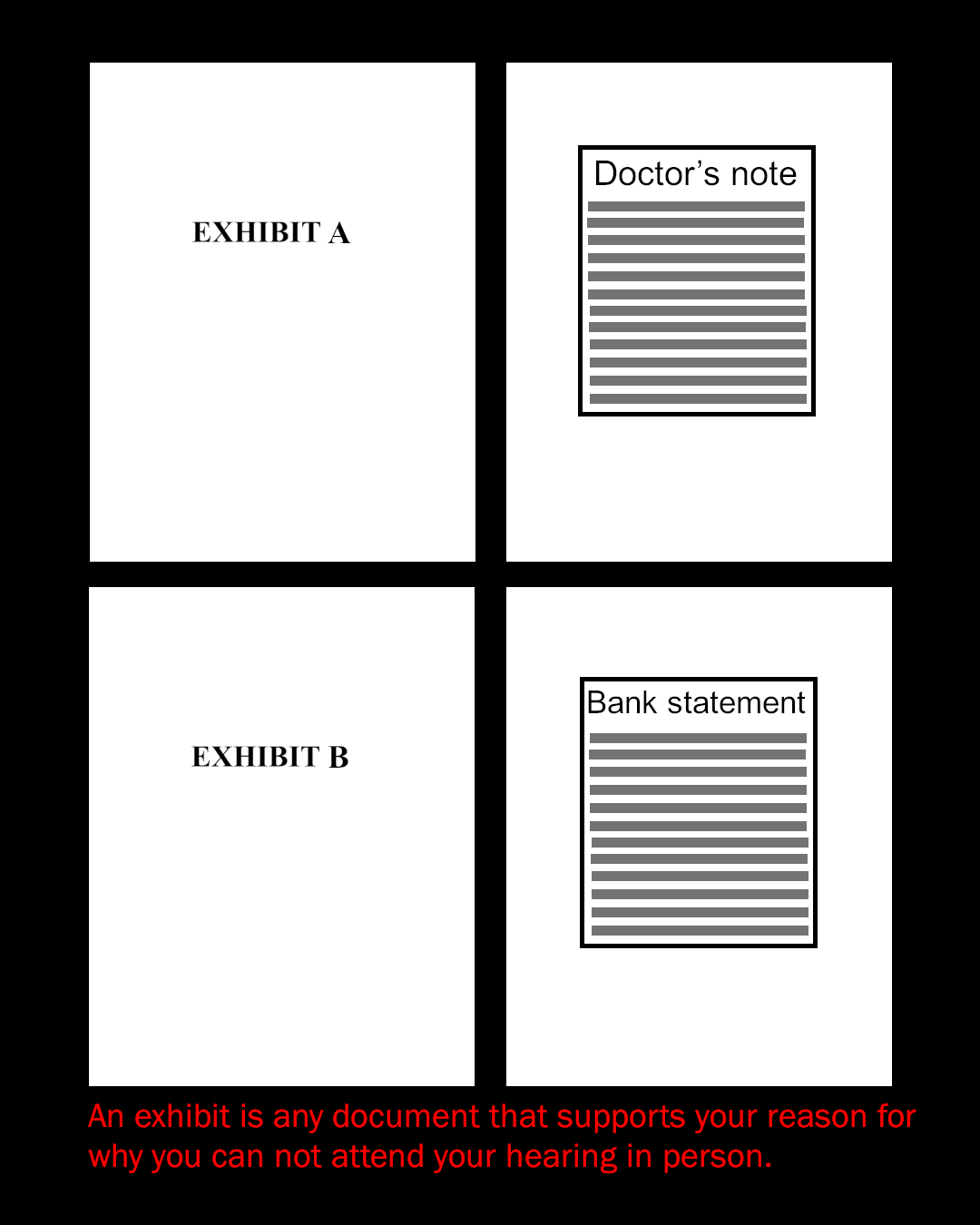
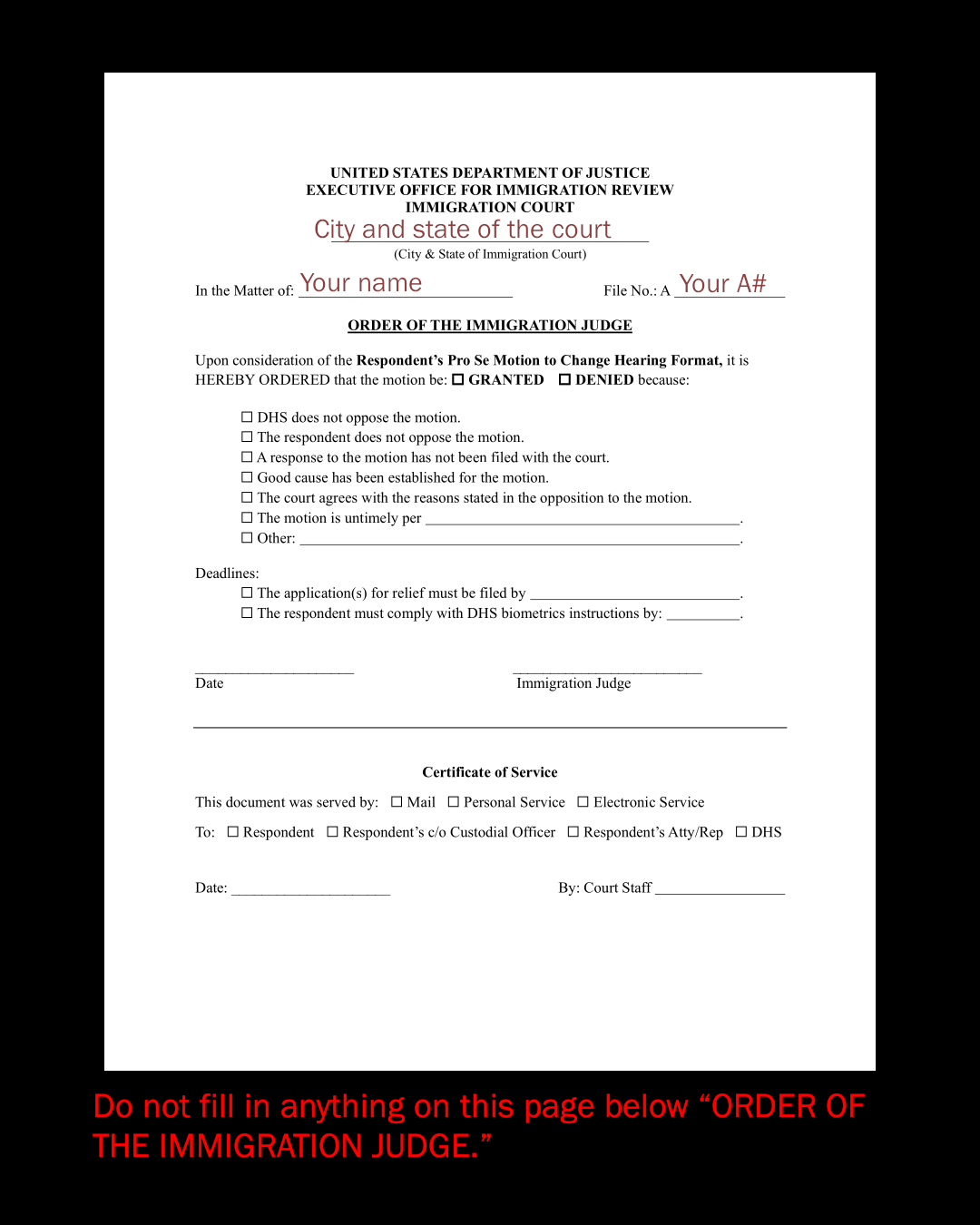
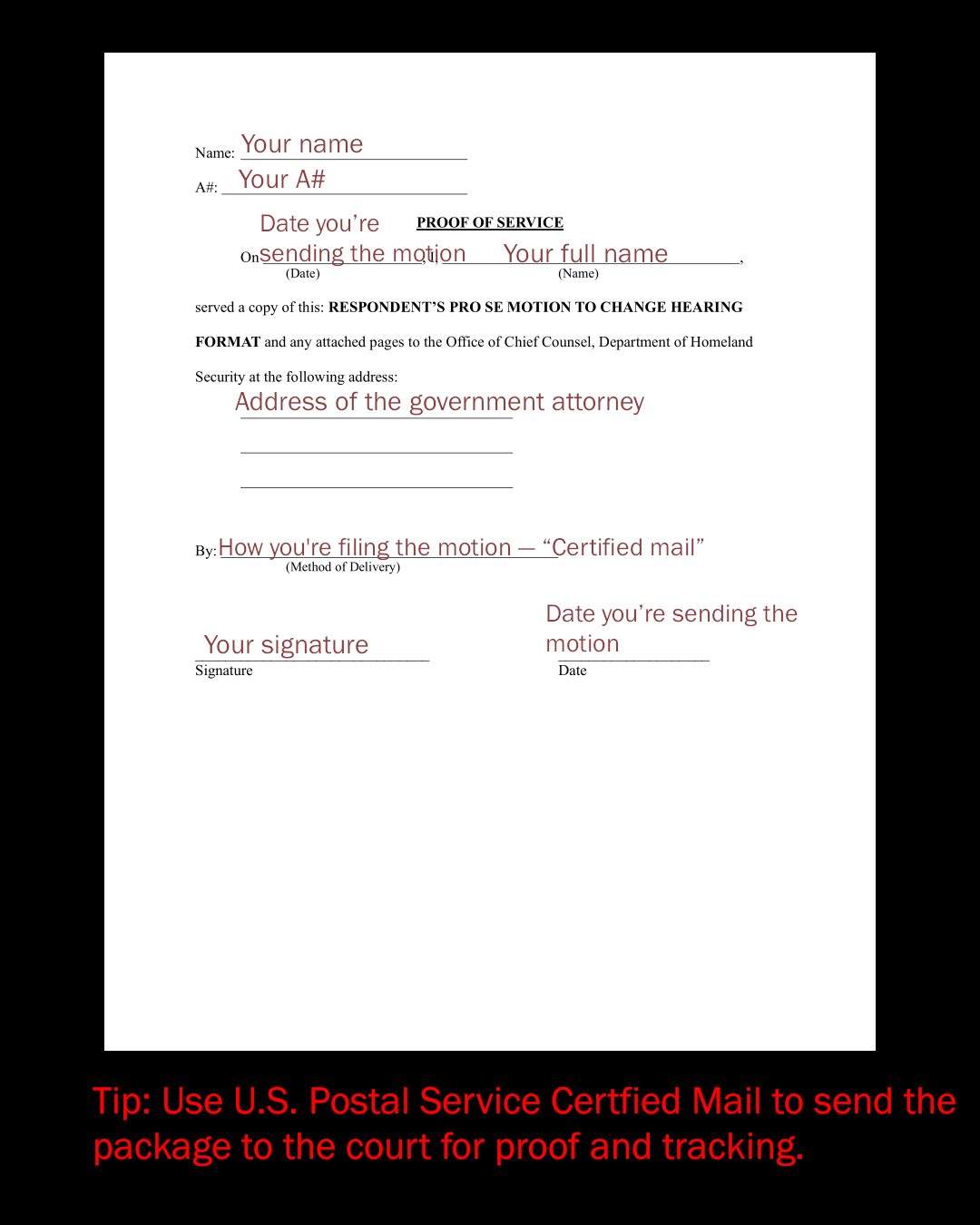
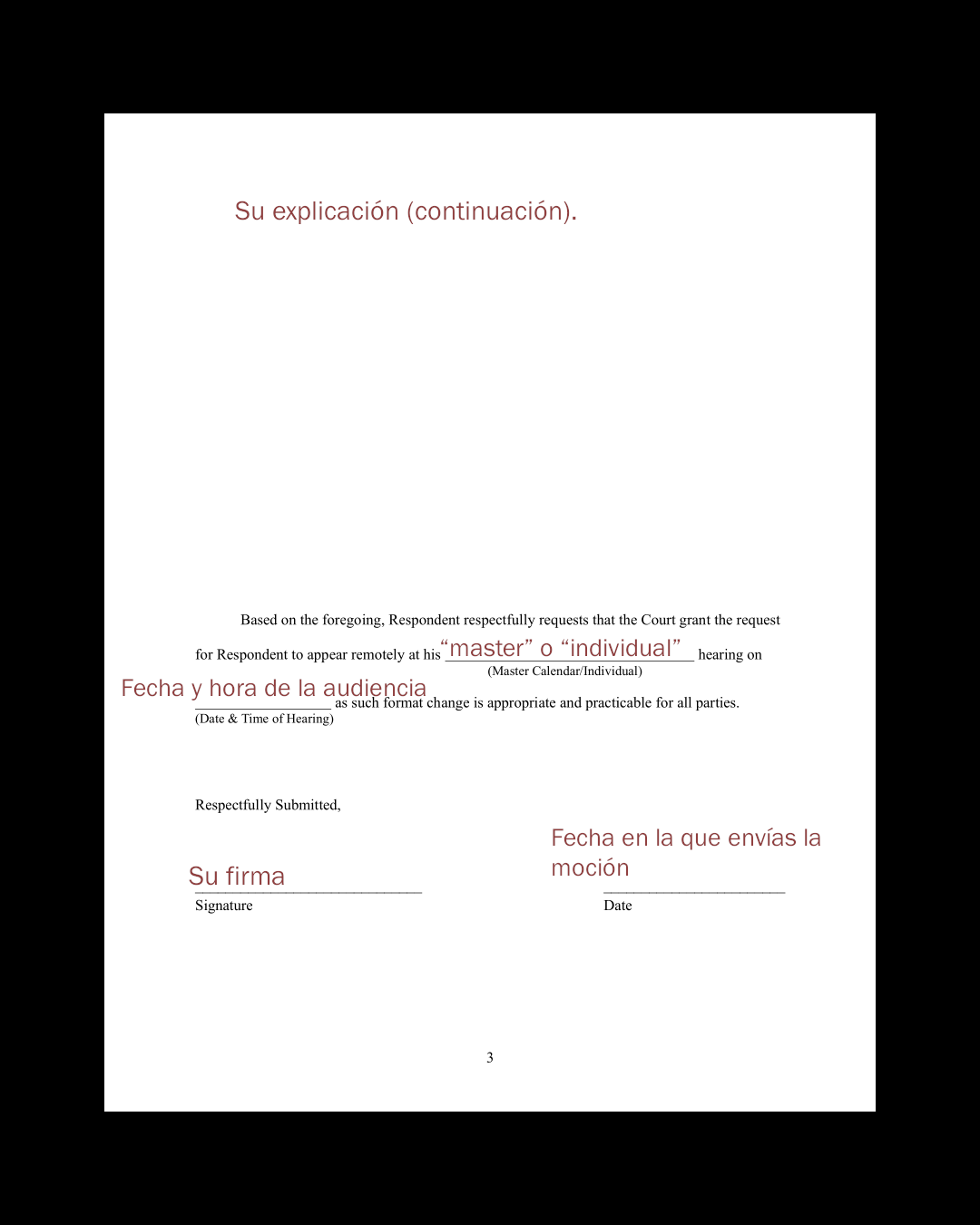
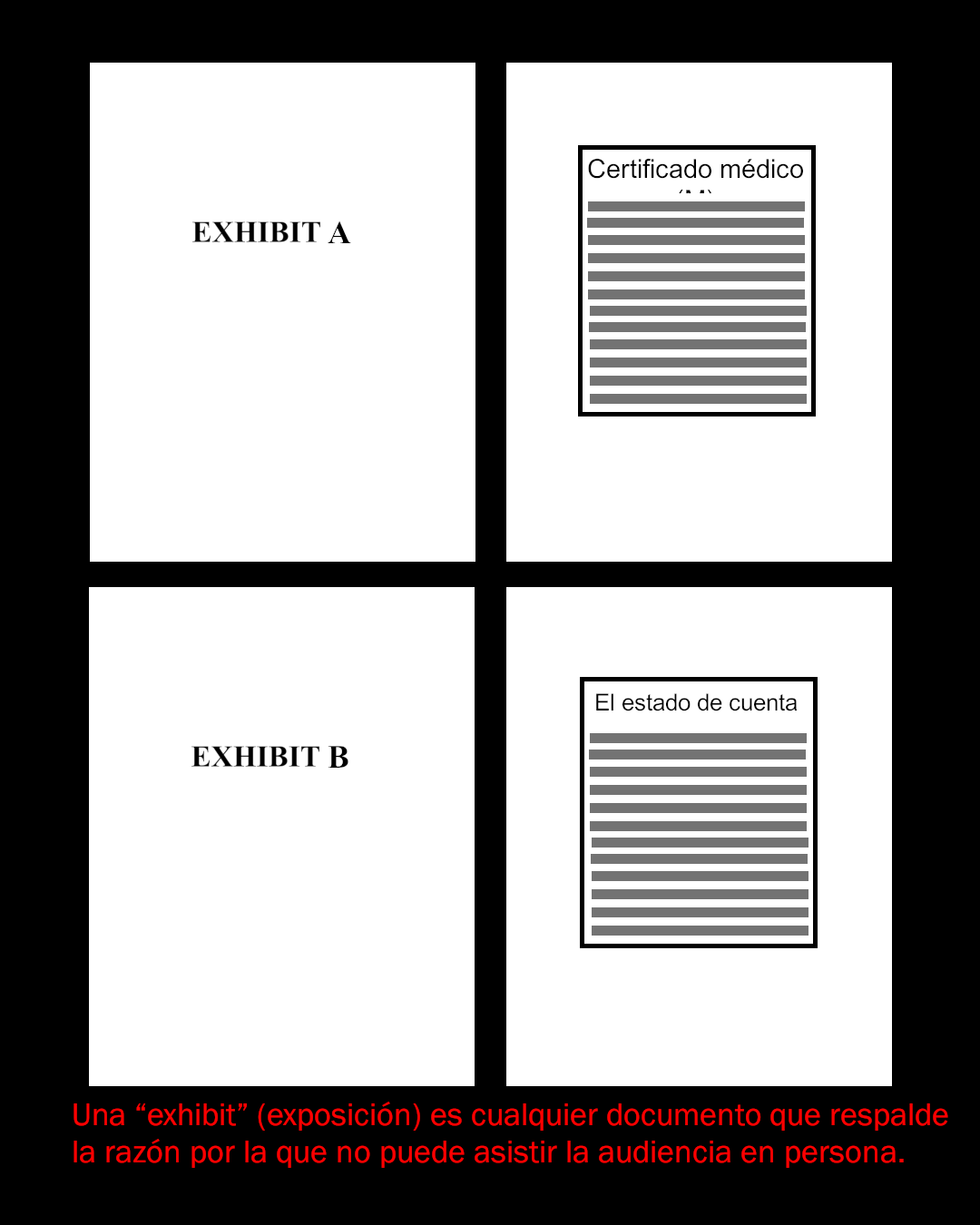
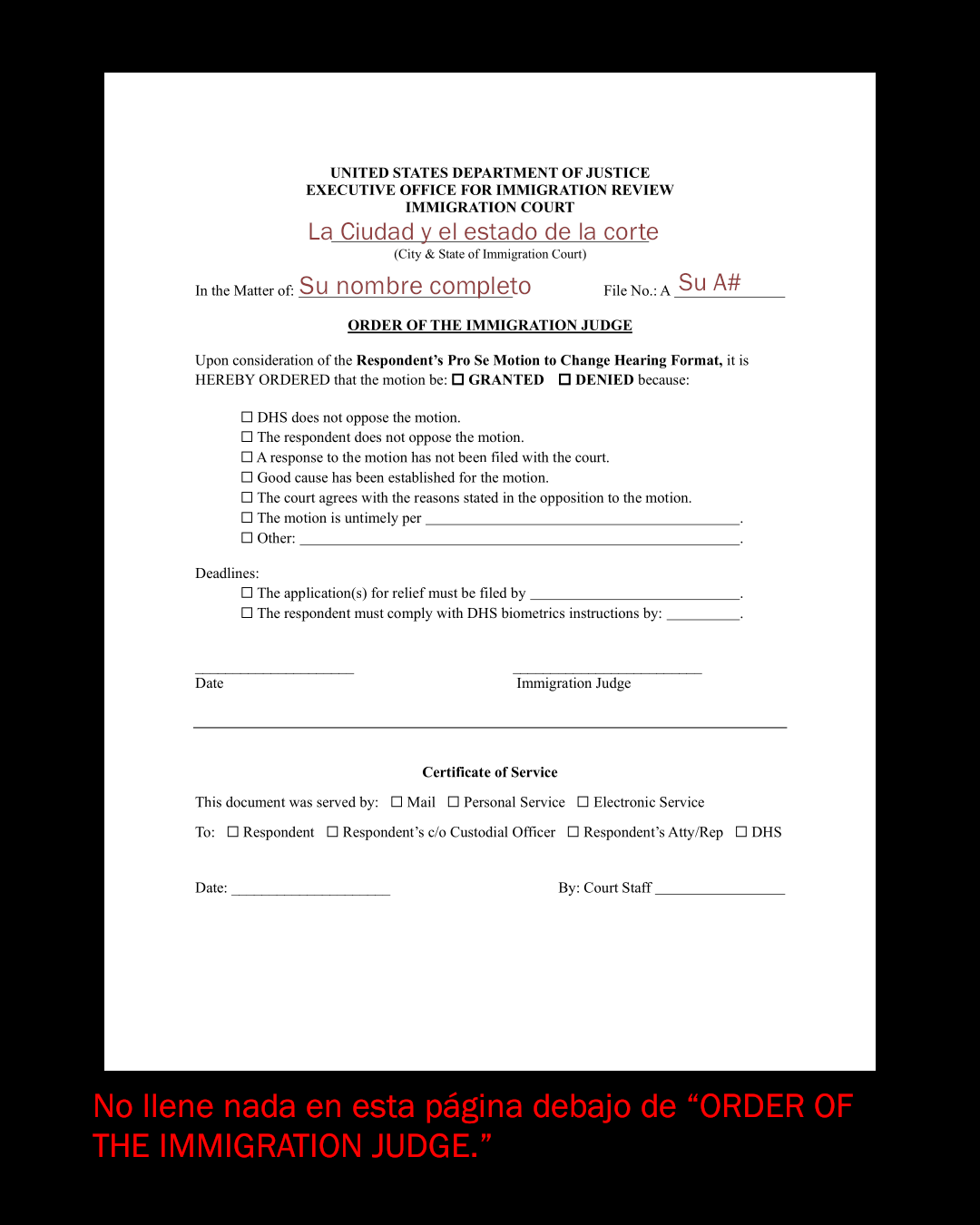
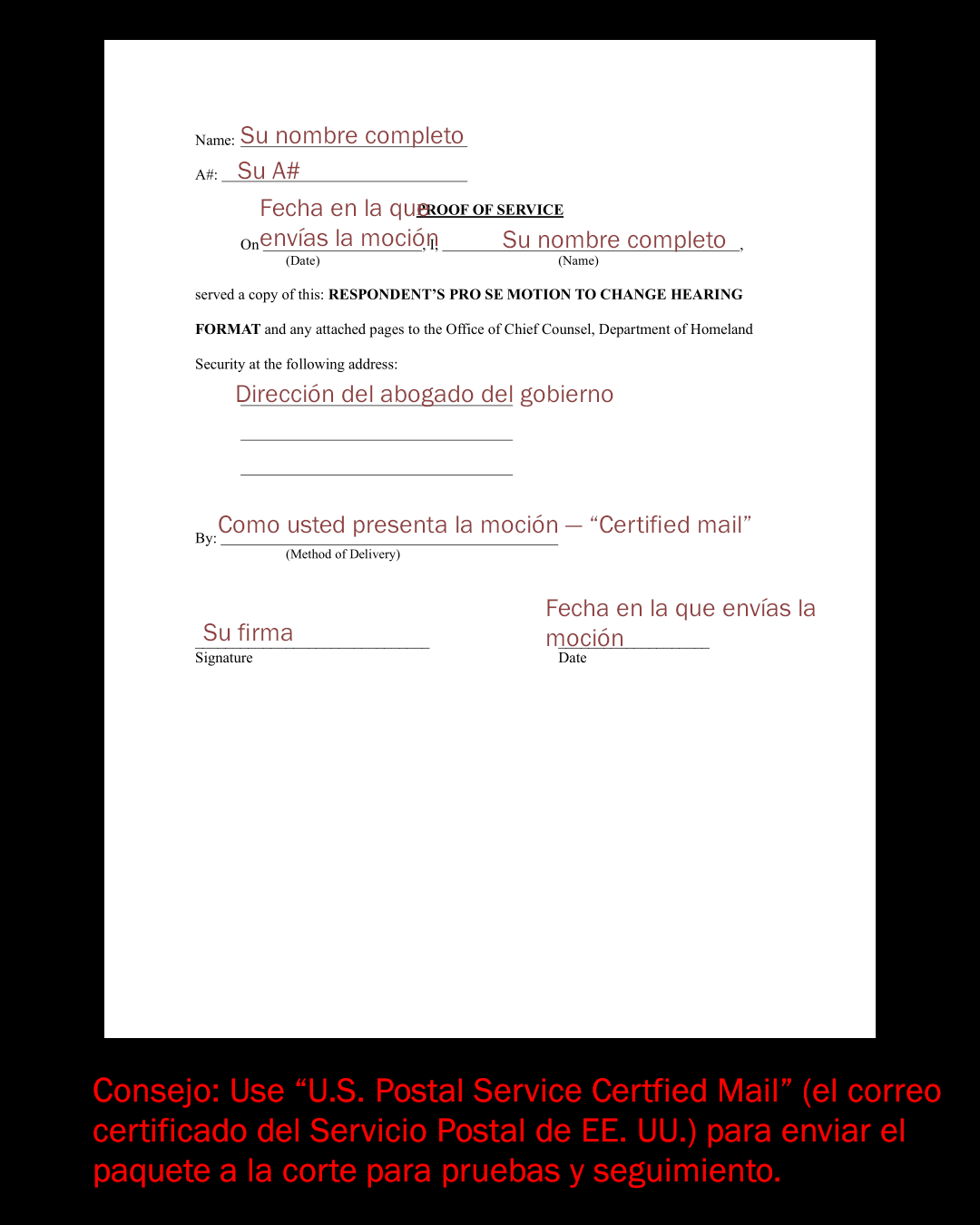
The motion is a legal filing with an explanation for why attending court in person is not possible along with evidence (or exhibits), a form for the judge to fill out, and a “proof of service” page. You can find a full set of instructions and a template at bit.ly/nipmotion. Download a fill-in-the-blank Word document at bit.ly/psmworddoc. The motion must be filled out in English.
In your motion, you can cite travel distance or expenses, lack of childcare, the need to care for a loved one who can not care for themselves, special school events, or other practical obstacles to attending in person.
It is ultimately up to the judge to decide whether or not to grant your motion. Judges have widely varying personalities, so more thorough explanations are more likely to be accepted.
WHEN TO SEND IT
As with other motions and responses, immigration courts want to receive the filing at least 30 days before the hearing. However, if you have less time, you should still submit a filing. Whether it is granted remains up to the judge. If you have a future court date, you can file right away.
WHERE TO SEND IT
You will send two versions of your Pro Se Motion to Change Format. One signed original document must be filed with your case’s immigration court, and a copy must be sent to the office of the government attorney that is prosecuting your case.
To find the address of your immigration court, find out from the Executive Office of Immigration Review (EOIR). Use your A# look online at https://acis.eoir.justice.gov/en/ or call 1-800-898-7180.
Send the copy to the government attorney, who usually works out of a locally based Office of the Principal Legal Advisor (OPLA) or Office of the Chief Counsel (OCC). The name and address for the government attorney who works for the “US Department of Homeland Security, Immigration and Customs Enforcement” will often be on the upper left corner of the cover pages of the government’s court filings.
If you are unable to determine the government attorney’s address from your own documents, you can ask the court for it. Do an EOIR lookup with your A# (https://acis.eoir.justice.gov) and use the listed contact information to ask the court for the government attorney’s address. Some OPLA/OCC offices have online portals for uploading. Find a list of OPLA mailing addresses here: bit.ly/oplasites.
WHAT’S NEXT
It is up to the immigration judge to grant or deny your motion. When that happens, the court will mail you the judge’s decision. But you can be proactive about checking the status rather than wait for the mail. After sending in your motion, you can look up your case on the EOIR website (https://acis.eoir.justice.gov/en/) and see whether the format of your case has changed. If the motion is granted, your case should be listed as “internet based.”
It is important that your technology works well during your remote hearing. The courts use a program called WebEx. Test whether WebEx works for your phone or computer here (https://www.webex.com/test-meeting.html). When it is time for your hearing, make sure your device is charged/plugged in, and find link to your courtroom’s WebEx channel here: bit.y/webexic.
RESOURCES
Find more complete instructions and templates from the National Immigration Project in English and Spanish here: bit.ly/nipmotion. Download a fill-in-the-blank Word document here: bit.ly/psmworddoc.
The USC Agents of Change Civil Rights Advocacy Initiative has been building teams of volunteers to help people file change of format motions. Contact them at 1-888-462-5211.
A partir de mayo de 2025, el Servicio de Inmigración y Control de Aduanas (ICE) y otras agencias federales están invadiendo los pasillos y vestíbulos de las cortes de inmigración, infundiendo miedo en las personas que desean luchar contra la deportación a través de canales legales.
Recuerde: Las personas en procesos de deportación pueden solicitar que sus audiencias sean en línea en lugar de en persona.
Los no ciudadanos con representación legal pueden hacer que sus abogados presenten una moción para trasladar sus audiencias en línea. Aquellos que no tienen abogados pueden hacerlo ellos mismos presentando una Moción pro se para cambiar el formato.
pro se: Representación de uno mismo (en las cortes); sin abogado.
Presentación de una moción pro se para cambiar el formato
LO QUE ESTÁ ENVIANDO
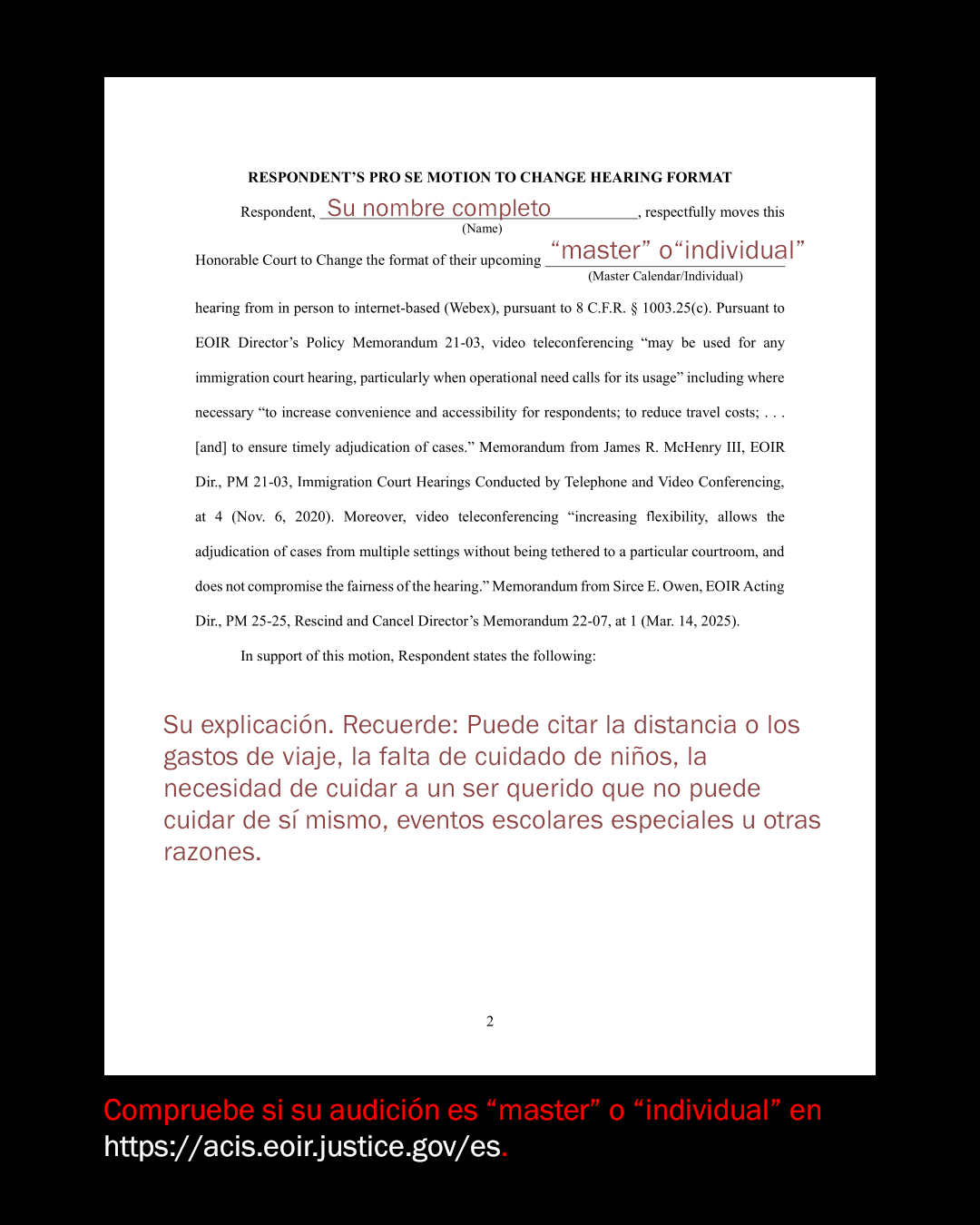
La presentación es una moción con una explicación de por qué no es posible asistir la audiencia en persona junto con evidencia (o “exhibits”), un formulario para que el juez lo complete y una página de prueba de entrega (“proof of service”). Puede encontrar un conjunto completo de instrucciones y una plantilla en bit.ly/nipmotion. Descargue un documento de Word para rellenar el espacio en blanco en bit.ly/psmworddoc. La moción debe ser llenada en inglés.
En su moción, puede citar la distancia o los gastos de viaje, la falta de cuidado de niños, la necesidad de cuidar a un ser querido que no puede cuidar de sí mismo, eventos escolares especiales u otros obstáculos prácticos para asistir en persona.
En última instancia, depende del juez decidir si acepta o no su moción. Los jueces tienen personalidades muy variadas, por lo que es más probable que se acepten explicaciones más detalladas.
CUANDO ENVIARLO
Al igual que otras mociones y respuestas, las cortes de inmigración quieren recibir la presentación al menos 30 días antes de la audiencia. Sin embargo, si tiene menos tiempo, aún debe presentar una presentación. La concesión de ella queda en manos de un juez. Si tiene una fecha de audiencia futura, puede presentar la demanda de inmediato.
DONDE ENVIARLO
Enviará dos versiones de su pro se Moción para cambiar de formato. Se debe presentar un documento original firmado ante la corte de inmigración de su caso, y se debe enviar una copia a la oficina del abogado del gobierno que está procesando su caso.
Para encontrar la dirección de su corte de inmigración, averigüe en la Oficina Ejecutiva de Revisión de Inmigración (EOIR). Use su look A# en línea en https://acis.eoir.justice.gov/es o llame al 1-800-898-7180.
Envíe la copia al abogado del gobierno, que generalmente trabaja en la Oficina del Asesor Jurídico Principal (OPLA) o en la Oficina del Asesor Jurídico Principal (OCC). El nombre y la dirección del abogado del gobierno que trabaja para el "US Department of Homeland Security, Immigration and Customs Enforcement." a menudo estarán en la esquina superior izquierda de las portadas de los documentos judiciales del gobierno.
Si no puede determinar la dirección del abogado del gobierno a partir de sus propios documentos, puede pedírsela a la corte. Haga una búsqueda de EOIR con su A# (consulte el sitio web o el número de teléfono anterior) y use la información de contacto indicada para pedirle a la corte la dirección del abogado del gobierno. Algunas oficinas de OPLA/OCC tienen portales en línea para cargar. Encuentre una lista de direcciones postales de OPLA aquí: bit.ly/oplasiteses.
QUE SIGUE
Depende del juez de inmigración aceptar o rechazar su moción. Cuando eso suceda, la corte le enviará por correo la decisión del juez. Pero puede estar proactivo a la hora de comprobar el estado en vez de esperar el correo. Después de enviar su moción, puede buscar su caso en el sitio web de EOIR (https://acis.eoir.justice.gov/en/) ay vea si el formato de su caso ha cambiado. Si la moción es aprobada, su caso debe aparecer como “internet based”.
Es importante que su tecnología funcione bien durante su audiencia remota. Los tribunales utilizan un programa llamado WebEx. Pruebe si WebEx funciona para su teléfono o computadora aquí: https://www.webex.com/test-meeting.html. Cuando llegue el momento de su audiencia, asegúrese de que su dispositivo esté cargado/enchufado, y encuentre el enlace al canal WebEx de su sala de audiencias aquí: bit.ly/webexic.
RECURSOS
Encuentre instrucciones y plantillas más completas del Proyecto Nacional de Inmigración en inglés y español aquí: bit.ly/nipmotion. Descargue un documento de Word para rellenar el espacio en blanco aquí: bit.ly/psmworddoc.
La USC Agents of Change Civil Rights Advocacy Initiative (Iniciativa de Defensa de los Derechos Civiles de los Agentes de Cambio) ha estado formando equipos de voluntarios para ayudar a las personas a presentar mociones de cambio de formato. Comunícate con ellos al 1-888-462-5211.